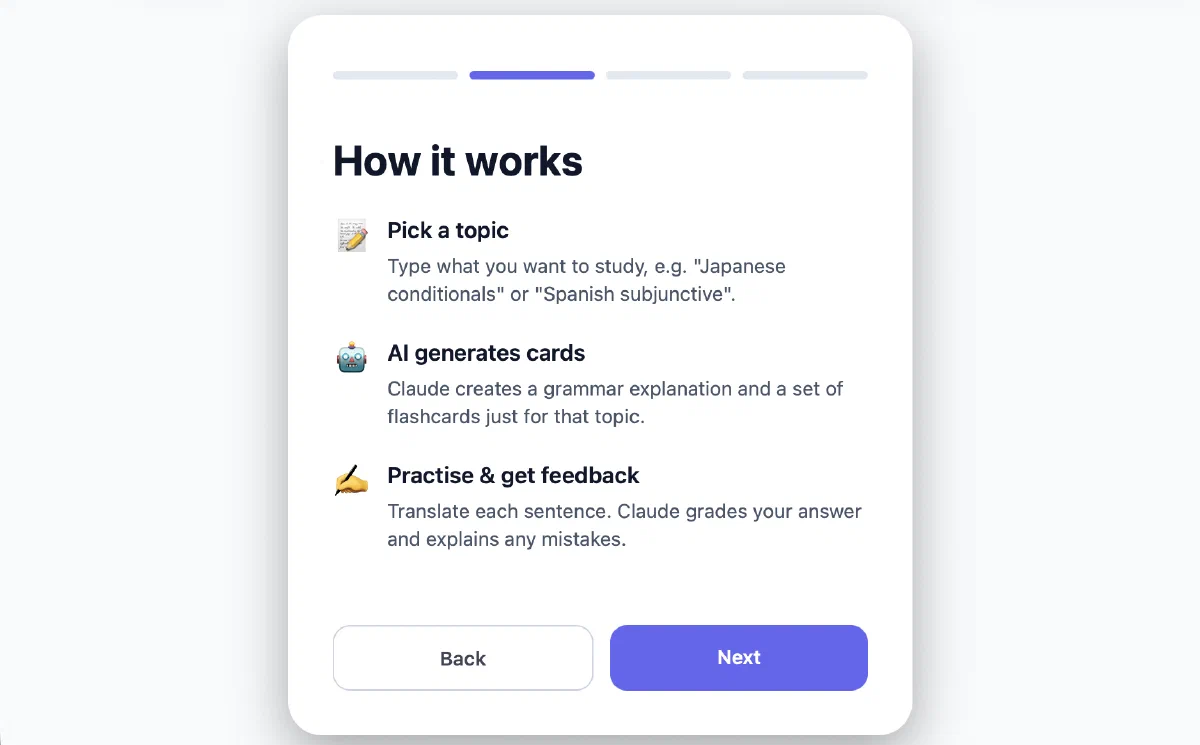
This article covers PatternDeck, the AI-assisted grammar study app I built in early 2026. It was born out of both love and frustration with Anki, and with using it to study not only Japanese vocabulary and kanji, but also grammar.
Grammar has two traits that make it awkward for ordinary flashcards:
- The learner needs full context of the grammar point, massively inflating card size and creation effort
- Grammar patterns can be applied in countless circumstances, which cannot be covered by human-generated flashcards.
My idea therefore was to build an app that uses AI assistants to generate the grammar explanations, and different-every-time flashcards to assist the learner studying grammar patterns.
Early implementation
As might have become evident from other articles on this site, I am a big proponent of starting development with an MVP that allows the developer to verify quickly whether the approach is worth pursuing in the first place.
The earliest complete version of GrammarCrammer, as the app was called then, asked the user to directly provide an Anthropic API key and implemented what is now PatternDeck’s Quick Study mode. This allowed me to directly test one AI model’s ability to generate sensible grammar explanations and cards for one language.
This version demonstrated the basic feasibility of the approach, but also revealed what was missing:
- I had left most of the UI implementation up to Claude because at this point my #1 priority was getting to an MVP quickly. Looking back on it, it is impressive how many elements of the MVP have persisted into the app as it is now, with elements like the markdown viewer restyled, but otherwise essentially unchanged to this date. However, it is also completely evident how little character the app has, using the same vibe-coded color scheme as most quickly-created projects.
- There was no way to store and schedule decks yet, which is essential for a flashcard-style app. To implement this, a proper backend was needed.
- The one-prompt-fits-all approach to explanation and language generation was not workable. Languages like Japanese need custom instructions for things like romaji or furigana usage.
It was at this point that I also decided I wanted to make the app not only for myself, but for other users too. For this, I would need to provide access to the app through a central API key and avoid non-technical users having to figure out what an “Anthropic API key” is. I would also need to invest more in UX, and add usage metrics to gauge whether people were actually interested in using it.
Implementation History
A lot happened! I’ll try to keep it short.
After the first prototype, the implementation shifted to creating a real production app. That changed the architecture quite a bit.
Backend and architecture
The first major step was moving from a client-only experiment to a proper client-server setup. I split the project into a TypeScript monorepo:
client/   React Native / Expo app for iOS, Android, and web
server/   Express + Prisma API server
shared/   Shared constants and types
The reason for this split was mainly control. AI calls needed to happen on the server, both to avoid exposing API keys and to make it possible to track usage. I also needed persistent users, saved decks, review history, and later push notification schedules. Those do not fit well into a purely local prototype.
The server started as an Express API with Prisma and SQLite. At first it handled the obvious things: users, deck storage, settings, and AI proxy endpoints. All Anthropic calls went through the backend from then on. This made the client simpler and made cost tracking possible. I added limits and ledgers for AI usage early, because even with no users yet, I wanted to try my best to limit possible misuse of the platform. PatternDeck was and still is unmonetized, so abusive usage effectively drains money out of my account 🙃.
Once the backend existed, I implemented saved decks and collections. This was the point where the app became much closer to a flashcard tool and less like a one-off prompt interface. Decks are stored as nodes in a tree, so users can organize material in nested collections. Each deck stores its topic, language, explanation, due date, interval, and review history.
The next phase was deployment.
While it would have been possible to deploy the frontend to Vercel and use some cloud provider for the backend component, I am the proud owner of a $1/month VPS at Ionos, which, except for this website, was unutilized at the time.
I added scripts to deploy to this server, with nginx serving the Expo web export and proxying API requests to the Express server. This script borrows liberally from the script deploying this blog, and I had already set up proper configurability through .env files from the start, so this part went smoothly.
Study flow and scheduling
After the core architecture was in place, I spent a lot of time on the study flow itself. I added streamed explanations over Server-Sent Events, sequential card generation, free-text answer judging, Markdown feedback, chat about the current card, and later word-level hints. This part was very iterative. Small prompt changes made a big difference, and I often had to adjust the UI and prompts together. For example, feedback became more useful once the judge received the grammar explanation context, but that also meant additional token usage. I made this configurable, and also added compacted context for cards, which explained the grammar point in an abridged way and thus saved on tokens.
The saved-deck flow then needed scheduling. I added review submission, AI and user star ratings, due dates, intervals, and a review history view. The scheduler is written as an easily exchangeable component, and deliberately simplistic at this point, adding simple multipliers to the current review interval without considering further review history as something like SM-2 or FSRS would. This allowed me to focus on more interesting aspects, with advanced scheduling being easily achievable if required.
At this stage, the project also started accumulating the ordinary, “boring” product features a release app needs: password reset, JSON import and export, settings persistence, API key management, a reworked central-key budget, and an admin panel for usage. None of these are the shiny part of the project, but they are the difference between a demo and something another person can actually try. In effect, I can sleep easy with the app being out because spend is hard-capped, and users do not need to write me an email if they locked themselves out of their accounts.
AI routing and cost control
Later, I also started generalizing the AI layer beyond a single Anthropic-only integration. The server gained a routing layer where every AI endpoint can choose a primary model and optional fallback model, with provider-specific cost tracking. I added support for Anthropic, OpenAI-compatible providers, OpenRouter, DeepSeek, Mistral, Kimi, and Qwen, plus a small abstraction for tool-use calls because each provider handles structured/tool responses slightly differently. This was partly about cost, but also about resilience: card generation and answer judging are high-volume tasks, so being able to move them to cheaper or faster models without rewriting the product code is valuable.
Design and platform polish
Since the first version had achieved its goal of proving feasibility, but still felt very generic and vibe-coded, I then spent time deliberately reworking the visual direction. I replaced the early placeholder styling with a more coherent color scheme, refined light and dark themes, redesigned the onboarding background, and iterated on buttons, cards, modal surfaces, loading states, and small motion details. This was less about adding features and more about making the product feel like something I had actually designed instead of something assembled from default components.
The cross-platform work came next, and it took more time than I expected. The app runs on web, iOS, and Android from the same Expo codebase, but that does not mean every interaction behaves correctly everywhere by default. I added native-style iOS sheets, platform-specific dropdowns, date and time pickers, bigger touch targets for icon-style buttons, mobile keyboard handling, Android inset fixes, Safari fixes, and IME-safe inputs. A lot of commits in the history are not new features, but polishing to make the app feel native on all platforms.
Around the same time, I added analytics and notifications. PostHog tracks screens, study-session behavior, errors, and AI usage events. Push notifications were added for due decks, with server-side schedules and delivery records to avoid repeated reminders for the same study day. This was also when I started filtering my own internal usage, because otherwise my testing polluted the data immediately.
The final larger product layer was the grammar-case system. Saved explanations are processed into smaller grammar subcases, each with a label, summary, generation hint, and weight. Card generation can then target under-practiced or difficult cases instead of sampling blindly from the whole explanation. This made the app feel more adaptive without adding much complexity to the user interface.
Late in development I also added a web-only explanation editor with Monaco, live preview, and an agentic AI editing chat. This was mostly for maintaining saved explanations. It lets the user ask for structured edits while still keeping the underlying explanation as Markdown, which fits the rest of the system well.
Looking back at the commit history, the implementation happened in roughly three waves: first proving the AI study loop, then building the backend and stored-deck product around it, and finally spending a lot of time on polish, platform behavior, observability, and scheduling. The first version showed that the idea was viable. The later work made it something I could actually hand to another person without immediately apologizing for half the interface.
This is what I have done as of the time of writing, June 28, 2026. For an up-to-date description of the architecture, check out ARCHITECTURE.md in the repo!
Results
The result is a working full-stack language-learning app with:
- AI-generated grammar explanations
- Dynamic practice cards
- Free-text answer judging
- In-session chat and hints
- Saved decks and nested collections
- Spaced-repetition scheduling
- Grammar subcase tracking
- JSON import and export
- Push notification support
- Email/password, Apple, and Google authentication
- Client and server analytics
- Cost tracking and budget enforcement
- Web, iOS, and Android builds from one codebase
The iOS and Android builds are functional as well, but I have not published them to the App Store or Google Play. Both stores add cost and maintenance overhead, and since PatternDeck is currently an unmonetized project, I decided to keep the public release web-only for now.
PatternDeck is not a commercial product. I do not have immediate plans to add monetization or advertise the product.
But it is also not an MVP, a half-baked personal project, or a demo. It is a complete product-shaped system around AI, with the boring parts included.
Takeaways
Working on PatternDeck was an interesting experience. As someone who is primarily a web developer, it taught me about React Native, and how it differs from normal React both inside and outside the code. I am convinced it made creating an app for three very different platforms more manageable. I also saw that, despite what one might think, something working on one platform does not mean it will work on the others when working in RN.
The main design lesson was the confirmation that AI features become much more interesting when they are given structure. A chat box can be useful, but a system that stores explanations, extracts subcases, tracks review outcomes, and feeds that back into future sessions can behave more like software and less like a prompt. Chatbots are amazing tools, but sometimes the problem is not chatbot-shaped. I know Google is working on this, and it will be interesting to see if PatternDeck is eventually auto-sherlocked.
Overall, PatternDeck sits close to the kind of software I enjoy building: applied AI, a real user workflow, enough backend complexity to be interesting, and a frontend where design details matter.